The Complete Guide to AI Game Design Summer Camps
Summer programs have a retention problem. By Wednesday of week one, half the students are bored. By Friday, attendance is dropping. The programs that keep students coming back every day share one thing in common: students are building something they care about.
AI game design camps solve the retention problem by design. Students walk in on Monday with nothing but an idea and walk out on Friday with a published, playable video game they built using AI tools. The feedback loop is immediate, the outcome is tangible, and the pride is real.
Here is everything you need to know about running one or enrolling your child in one.
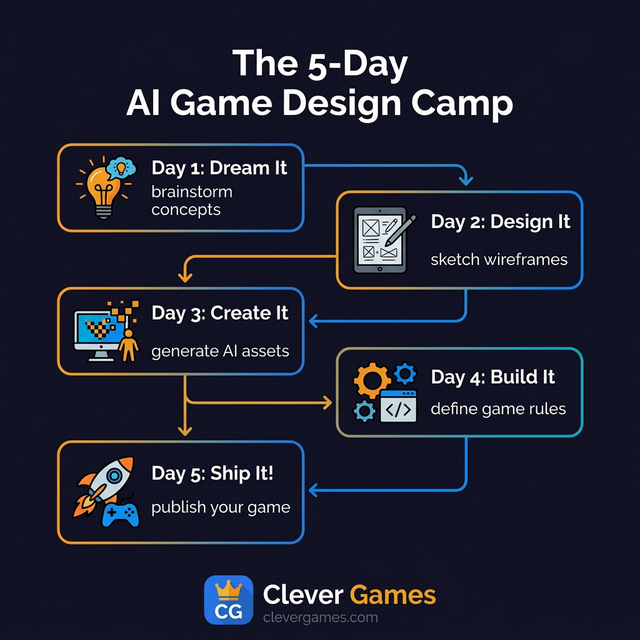
What Students Actually Do
An AI game design camp is not a passive experience. Students are not watching tutorials or following along with pre-built examples. They are making decisions at every step:
Day 1 - Dream It: Students brainstorm game concepts, choose a genre (platformer, puzzle, racing, adventure), and define their creative vision. What is the game about? Who is the main character? What makes it unique? Facilitators guide them through an ideation framework that prevents the blank-page paralysis most students experience.
Day 2 - Design It: They sketch wireframes on paper first, then digitally. They pick color palettes, plan screen layouts, and learn the basics of visual hierarchy. This is design thinking in action, and it transfers to every visual communication skill they will ever need.
Day 3 - Create It: Using AI-powered image generation tools, students create their own characters, backgrounds, obstacles, and items. Every asset is original. Students learn how to write prompts that produce specific visual results, iterating until the output matches their vision.
Day 4 - Build It: Students define the rules of their game using natural language prompts. How does the player move? What happens when they touch an enemy? How do you win? How do you lose? The AI translates these instructions into working game logic. Students playtest continuously and adjust.
Day 5 - Ship It: Students add sound effects, music, and animation. They do a final round of playtesting, write a game description, submit for instructor review, and publish. Once approved, the game goes live with its own shareable URL.
By the end of the week, every student has a real game that anyone in the world can play. That is not a hypothetical outcome. That is the actual deliverable.
Why AI Game Design Specifically
There are plenty of STEM summer camps out there. Coding camps, robotics camps, 3D printing camps. What makes AI game design different?
The Barrier Is Lower
Students do not need to know how to code. They describe what they want in natural language, and the AI handles the technical implementation. This means students who have never touched a programming language can still create sophisticated, playable games. The traditional barrier that filters out 80% of students on day one simply does not exist.
The Ceiling Is Higher
Because students are not spending their time debugging syntax errors or fighting with compilers, they have more mental bandwidth for actual creative thinking: narrative design, visual aesthetics, game balance, and user experience. The conversations in the room shift from "why is my code broken" to "how do I make this game feel better to play."
The Output Is Shareable
A student who builds a robot at camp has a photo to show their parents. A student who 3D prints a keychain has a physical object. But a student who publishes a game has a URL they can text to their friends, their grandparents, and their future teachers. The game lives on the internet after camp ends. It becomes a portfolio piece. It has permanence.
The Skills Transfer Everywhere
Prompt engineering, which is the core skill students develop, is not limited to game design. It applies to writing research papers, creating presentations, analyzing data, generating creative content, and virtually every professional field that uses AI tools. The students who learn to be specific, iterative, and thoughtful in their interactions with AI at age 12 will carry those habits into college and career.
It Meets the AI Literacy Mandate
Schools and districts are increasingly required to address AI literacy. The U.S. Department of Labor published an AI Literacy Framework that outlines the skills every student needs. AI game design camps align directly with this framework because students learn to prompt, evaluate, iterate, and think critically about AI output.
Camp Formats That Work
Different programs have different constraints. Here are the three most common formats:
1-Week Intensive (5 days, 3-4 hours/day)
The classic format. One curriculum unit per day. Best for summer sites with rotating weekly themes or programs that want to offer AI as one of several options. Students complete one game per week.
Ideal for: Recreation departments, YMCA/YWCA programs, rotating enrichment sites
2-Week Deep Dive (10 days, 2-3 hours/day)
More time means deeper exploration. Students can iterate on their designs, collaborate with peers, and really polish their games. Some students create multiple games or build more complex projects with layered mechanics.
Ideal for: Programs wanting maximum creative depth, sites with a consistent student cohort
Half-Day Camp (5 days, 5-6 hours/day)
Mornings for game design, afternoons for playtesting, peer reviews, and preparing for the big showcase. The extended time allows for collaborative projects where teams of 2 to 4 students build a single, more ambitious game together.
Ideal for: Full-day summer programs, school-site camps, enrichment academies
All three formats follow the same proven arc: imagination to publication. The curriculum materials include pacing guides for each format.
What You Need to Run One
The requirements are simpler than most people expect:
| Requirement | Details |
|---|---|
| Devices | One per student. Chromebooks, iPads, laptops, or desktops all work. Everything is 100% browser-based. |
| Internet | A reliable connection. AI tools require connectivity for asset generation. |
| Space | Any classroom, library, or community room with tables and power outlets. |
| Facilitator | One trained adult per 15-20 students. No technical background required. |
| Platform | A COPPA/FERPA compliant AI game design platform like Clever Games with content moderation and instructor-gated publishing. |
| Projector | Optional but helpful for group demos and the final showcase. |
You do not need special software, IT support, or technical infrastructure beyond a working internet connection.
Safety and Privacy
If you are a parent considering an AI camp for your child, or an administrator evaluating a vendor, here is what to look for:
Non-Negotiable Requirements
- COPPA compliance: The platform should not collect personal information from children under 13 without parental consent. Students should be able to participate using only a username.
- FERPA compliance: Student data should be protected and not shared with third parties. A Data Processing Agreement (DPA) should be available.
- Content moderation: All AI-generated content should be reviewed before being published publicly. Inappropriate prompts should be blocked before generation occurs.
- Username-based identity: Students should use display names rather than real names on any public-facing content.
- Instructor-gated publishing: No game should go live without explicit approval from a facilitator or instructor.
Red Flags to Watch For
- The platform requires students to create accounts with personal email addresses
- There is no content moderation or review process for published content
- The vendor cannot clearly explain their COPPA/FERPA compliance
- Games are published immediately without instructor review
- The platform shares student data with third parties for advertising
These are not optional nice-to-haves. They are requirements for any program serving minors.
Making It a Capstone Event
The best camps end with a bang. Here are ideas that work:
Game Showcase (Most Popular)
Set up stations where each student demos their game. Invite parents, school administrators, and community members. Give each student 3 to 5 minutes to present. Provide comment cards so visitors can leave feedback.
Hackathon Finale
On the last day, run a timed challenge where teams build a game around a surprise theme in 2 to 3 hours. This works especially well for 2-week camps where students already have platform experience. For schools that want to make the hackathon a bigger event, check out the Clever Games Hackathon program.
Awards Ceremony
Categories that generate excitement:
- Most Creative Concept
- Best Visual Design
- Smoothest Gameplay
- Best Sound Design
- Best Storytelling
- Audience Favorite (voted by visitors)
Community Play Day
Open the published game library to the public and let community members play and vote on their favorites. This works well for parks and recreation programs or library-hosted camps.
For Parents: What to Ask Before Enrolling
If you are evaluating an AI summer camp for your child, ask these questions:
- Is the platform COPPA and FERPA compliant? If they cannot answer this immediately and clearly, move on.
- Does my child need coding experience? The answer should be no.
- What does my child take home? The answer should be a published, shareable game with a URL.
- Who is facilitating? Look for trained adults, not just volunteers.
- What devices are needed? Any browser-based platform should work on whatever your child already has.
- How is content moderated? Every game should be reviewed by an adult before publishing.
- What happens after camp? Can my child continue building games? Is there an afterschool program option?
Measuring Success
For program administrators, here is what to track:
| Metric | Target | How to Measure |
|---|---|---|
| Daily attendance rate | 85%+ | Sign-in records |
| Games published | 1 per student | Platform data |
| Student satisfaction | 4.0/5.0+ | End-of-camp survey |
| Parent satisfaction | 4.0/5.0+ | Parent survey |
| Return interest | 70%+ | "Would you attend again?" question |
These numbers help you justify continuing the program, expanding to additional sites, and securing future funding.
Connecting to Year-Round Programs
A summer camp is often the gateway to a longer relationship. Students who love their camp experience are natural candidates for:
- Afterschool programs during the school year
- Hackathon events as capstone competitions
- Advanced game design tracks that go deeper into specific genres
The best approach is to mention the year-round options during the camp showcase, when families are most engaged and excited about what they have seen.
Next Steps
Whether you are a camp director, a school administrator, or a parent, the opportunity is the same: give young people a week to create something real with AI, and watch what happens.
Explore Summer Camp options with Clever Games or contact us to book your summer program.
The Clever Games team writes about AI in education, game design, and the future of K-12 computer science. We build tools that help students learn by creating.
View all articles →